
Your RAGE Custom account gives you a single place to manage everything, from tracking orders and earning rewards to updating your details and getting support. To access it, click the account icon in the top-right corner of any page on ragecustom.com and log in.
Your account dashboard
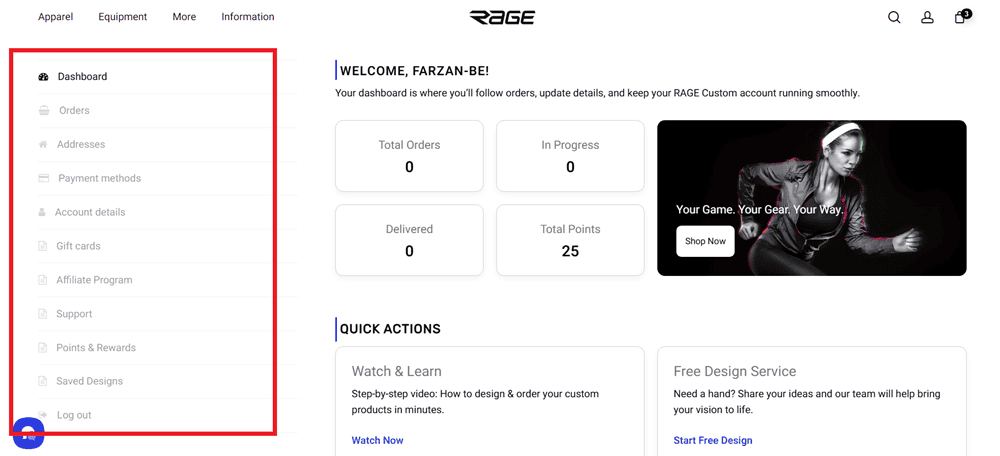
Once you log in, your dashboard shows a snapshot of your account activity: total orders, orders in progress, deliveries, and your current points balance. You'll also find quick links to start a new order, request our Free Design Service, watch design tutorials, or contact support.
What you can do in your account
Your account sidebar gives you access to the following:
Orders - View your full order history, check order status, and access details for any past or current order. → How do I track the status of my order?
Addresses - Manage your saved billing and shipping addresses. Both can be edited at any time and will be pre-filled at checkout for faster ordering. → How do I update my account details, saved addresses, or password?
Payment Methods - If your chosen payment method supports it, you can save it here for faster checkout on future orders.
Account Details - Update your first name, last name, display name, email address, and password. → How do I update my account details, saved addresses, or password?
Gift Cards - Check the balance on any gift card using the recipient email and gift card code, or purchase a new gift card. → Gift Cards
Affiliate Program - Join or learn more about the RAGE Custom affiliate program. Once approved, you'll get your own referral link, marketing resources, and a dashboard to track your earnings. → Programs & Rewards
Support - View, search, and manage your support tickets. You can also create a new ticket directly from this page, giving you a full record of any conversations with our team.
Points & Rewards - Track your points balance, see your current reward tier and progress toward the next one, copy your personal referral link, view your rewards and coupons, and check your earning activity. → Programs & Rewards
Saved Designs - Browse designs you've previously saved through the online design tool. You can reorder or pick up right where you left off.
Need help with your account?
→ How do I create an account or sign in?
→ I forgot my password or login details
→ How do I update my account details, saved addresses, or password?